
To turn a musical idea into a finished song with an AI music generator, describe what you want in plain words (genre, mood, tempo and subject), add your own lyrics if you have them, generate a first version, then refine the style, instruments and structure until it matches the sound in your head. With a text-to-music tool you can go from a voice-note idea to a complete, downloadable track in one sitting, without a studio or years of production training.
This guide walks through that process step by step, shows how to write prompts that actually get good results, and explains where an AI tool fits alongside traditional music software. The examples use Tomusic, a text-to-music platform that creates full songs, beats and instrumentals from written prompts or lyrics.
Why So Many Song Ideas Never Get Finished
Most people who love music have a folder of half-ideas: a melody hummed into a phone on the way to work, a chorus line scribbled at midnight, a feeling they wish had a soundtrack. The problem is rarely talent. It is the gap between the idea and a produced track.
Traditional production asks a lot before you hear a single finished bar. You need an instrument or a digital audio workstation (DAW), time to learn arrangement and mixing, and the patience to tweak sounds for hours. By the time the technical work is done, the original spark has often faded. AI song generators close that gap by handling arrangement, instrumentation and mixing, so you can focus on the creative decisions: what the song is about and how it should feel.
What a Text-to-Song Tool Actually Does
You give the tool a description, lyrics or both. It then generates a complete piece of music with a melody, chord progression, rhythm section and, where requested, vocals, arranged into sections such as verse, chorus and bridge. You listen, adjust the prompt or settings, and generate again until you are happy.
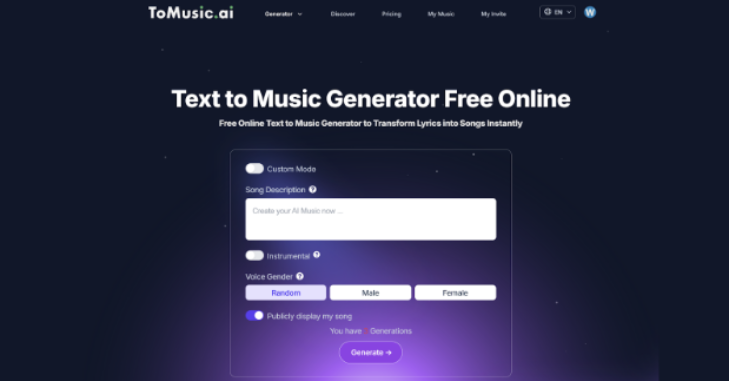
Tomusic offers a few ways in, according to its own feature descriptions:
- Simple mode: type a handful of keywords, for example “sunset drive, relaxed, synthwave”, and get a full track.
- Custom mode: control lyrics, structure, energy level, influences and specific instructions.
- Special modes: starting points such as turning a story into a song or matching music to a mood or the weather.
Step-by-Step: Create Your First Finished Song
- Decide what the song is for. Background music for a video, a personal gift, a beat to rap over, a demo of your own lyrics or a teaching aid each call for different choices.
- Describe the sound. Name the genre, mood, tempo (in BPM if you know it), energy level and any reference styles. “Warm indie-folk, mid-tempo, acoustic guitar and soft harmonies” works far better than “a nice song”.
- Add specifics. Paste lyrics, describe the scene or story, mention the audience and point out the emotional peak, such as “big lift into the final chorus”.
- Generate and listen closely. Play the first version all the way through. Note what works and what does not: the vocal tone, the drums, the length of the intro.
- Refine one thing at a time. Change the tempo, swap instruments or ask for a stronger chorus. Small, specific changes are easier to judge than rewriting the whole prompt.
- Download and use it. Export the version you like for your video, playlist or project, and keep your best prompts so you can reuse the formula.
7 Ways to Turn Different Ideas Into Music
1. Write a full song from a text description
Type the theme, mood and story and let the tool build everything else. Example prompt: “An uplifting pop song about overcoming self-doubt, with a catchy, sing-along chorus.” This works well for personal projects, video soundtracks and quick demos.
2. Add a melody to lyrics you have already written
If you write words first, paste them in and choose a style. Example: “Set my lyrics to a warm indie-folk melody with a memorable chorus.” Check that the melody respects the natural stress of your words; if a line sounds rushed, shorten it or split it across two bars.
3. Make beats for rap, EDM or pop
Describe the tempo, genre and energy, and leave room for vocals. Example: “Late-night trap beat, moody pads, 140 BPM, space for verses and a hard drop.” Asking for clear sections helps you write and record over it later.
4. Turn a story or memory into a song
Share a moment and let the tool translate it into lyrics and melody. Example: “Turn my first road trip with friends into a nostalgic indie-rock song.” These make thoughtful gifts for birthdays, anniversaries and reunions.
5. Match music to a mood
Use mood words to set the atmosphere. Example: “Mysterious ambient track for a podcast episode about unsolved mysteries.” This is ideal for podcasters, vloggers and focus or meditation playlists.
6. Build an album concept
Outline a theme and five to ten track ideas, then generate them with a shared description of the sound. Example: “A 6-track lo-fi album for late-night study, each track with a distinct mood but the same warm, dusty texture.” Keeping one consistent phrase in every prompt helps the tracks feel like a set.
7. Refine and evolve an existing track
Once you have a version you like, push it further: “Same song, but with cinematic strings, a slower tempo and a bigger lift into the chorus.” Iterating is where an idea becomes a finished song.
How to Write Better Music Prompts
The quality of the output depends heavily on how clearly you describe what you want. A useful prompt usually covers five elements:
| Element | What to include | Example |
|---|---|---|
| Genre | One main style, plus an influence if needed | Synthwave with a touch of 80s pop |
| Mood | Two or three emotion words | Hopeful, nostalgic, calm |
| Tempo and energy | BPM or a plain description | Around 90 BPM, laid-back groove |
| Instruments | Lead sounds and texture | Piano, soft strings, light percussion |
| Structure | Sections or key moments | Short intro, two verses, big final chorus |
Common mistakes include stacking too many genres in one prompt, asking for contradictory moods (“aggressive and relaxing”), and leaving out the purpose of the track. If a result misses the mark, change one element at a time so you can hear what made the difference.
Prompt ideas you can copy
- “Cinematic pop anthem with a soaring chorus about finding strength after failure.”
- “Soft piano and strings for meditation, 60 to 70 BPM, warm and calm.”
- “Turn this story into a song: I moved to a new city alone and found hope in small moments.”
- “Summer beach track with tropical house vibes, a catchy melody and a bright drop.”
- “Set these lyrics to a soulful R&B melody with a memorable pre-chorus hook.”
- “Playful eight-second jingle for an eco-friendly brand, fresh and optimistic.”
Using AI-Generated Songs for Different Goals
Content creators
Original background music for YouTube, TikTok and podcasts helps your channel sound distinctive and avoids reusing the same stock tracks as everyone else. Describe the episode theme and pacing so the music supports rather than competes with your voice.
Teachers and learners
Songs make facts easier to remember. Turning times tables, vocabulary or history timelines into short, catchy tracks can help students recall them, and the process of writing the lyrics is a learning exercise in itself.
Businesses and brands
Small businesses can create music for adverts, product launches, events and in-store playlists with a consistent sound that reflects the brand. Describe your brand values (“warm, modern, confident”) as you would to a composer.
Personal moments
A song about a shared story makes a memorable anniversary, proposal or birthday gift. Include names, places and small details in the prompt or lyrics to make it feel personal.
AI Song Generators vs Traditional Music Software
| Factor | AI text-to-music tool | Traditional DAW |
|---|---|---|
| Skills needed | Ability to describe what you want | Arrangement, sound design and mixing knowledge |
| Time to a first full track | Minutes | Usually hours or days |
| Creative control | Through prompts, modes and settings | Total, note by note |
| Upfront cost | Often free to start, with paid plans | Software, plugins and equipment can add up |
| Best for | Fast ideas, demos, content music, gifts | Detailed professional production |
Many musicians use both: an AI tool to sketch ideas quickly and test directions, then a DAW or live instruments for final, detailed work. Before using any generated track commercially, read the platform’s current licensing and plan terms, since rights can differ between free and paid tiers.
Frequently Asked Questions
Do I need music skills to create a song with AI?
No. If you can describe a mood, style or story in words, you can generate a song. Some musical knowledge helps you write sharper prompts, such as naming a tempo or instruments, but it is not required.
Are AI-generated songs original?
Each generation is created fresh from your prompt rather than copied from a fixed library, so results differ every time. For anything you plan to release, listen carefully and check the platform’s terms on originality and ownership.
Can I use songs made with Tomusic commercially?
Tomusic states that creators can use their songs, but rights can vary by plan. Check the current terms on its website before using a track in ads, paid content or a release.
How long does it take to make a finished song?
A first version usually takes minutes. Plan on several rounds of refinement to get a track you are fully happy with, especially if you are setting your own lyrics.
Can I make a whole album with an AI music tool?
Yes. Outline a theme and track list, keep a consistent description of the sound in each prompt, and generate the tracks one by one. Review them together to make sure the album flows.
Final Thoughts: From Idea to Finished Song
The fastest way to finish more songs is to lower the barrier between the idea and the first full version. Pick one idea from your notes today, write a clear prompt covering genre, mood, tempo, instruments and structure, generate it, and refine one element at a time. Once you hear your idea as a real track, it becomes much easier to keep shaping it into something you are proud to share.