
Many people have dreamed of forming their own band, but the reality is often challenging: finding a reliable drummer, mastering complex production software, or spending years learning music theory. Today, these barriers are fading away. With the right tools, anyone with a creative spark can become a band leader. When you use a AI Music Generator like Musick AI, you essentially step into a professional recording studio where the musicians are always on call and ready to play any style you can imagine.
This guide skips the technical jargon and focuses on how to use modern tools to step-by-step train and manage a professional-sounding virtual band that fits your specific style.
I. From Vision to Sound: Setting the Foundation and Choosing Your Mode
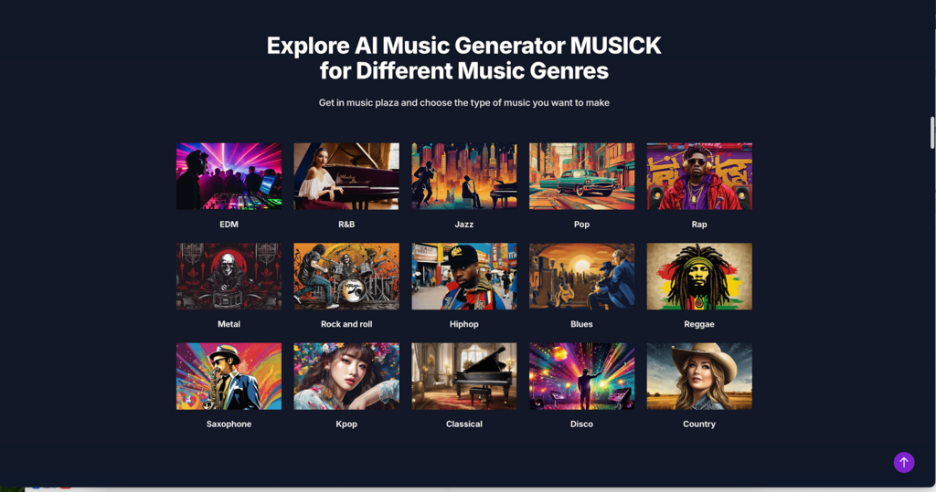
The secret to a great band lies in its consistency and soul. Before hitting the record button, it is essential to visualize the “vibe” of the group. Think of this as the branding phase for your digital performers. Are they a gritty underground rock group, or a polished synth-pop duo? When you first explore the Musick AI dashboard, the diversity of genres available is the first thing you will notice.
To turn these visions into reality, you can choose between two distinct workflows depending on your level of expertise:
- Simple Mode (The Creative Shortcut): This is ideal for those who prefer describing a feeling rather than tweaking knobs. In the description box, avoid generic phrases. Instead of saying “a good song,” try something more descriptive like: “A bright summer beach pop song with shimmering synthesizers and an upbeat drum kit.” In this scenario, the AI Music Generator automatically matches instruments and melodies to these cues. You only need to select the vocal gender and click generate to hear the band’s first demo.
- Custom Mode (The Producer’s Desk): If you want a truly unique “signature sound,” this mode offers much deeper control. This is where you move from being a listener to being a producer. You can paste original lyrics directly into the system or use the built-in tool to help generate them if you have a “writer’s block.”
- Style Fine-Tuning: Beyond selecting a genre, you can add specific mood words (such as Energetic, Melancholic, or Gritty). This is the most rewarding part of the process to create music, acting as the director in a rehearsal room, guiding the players on exactly how to perform and where to place the emotional emphasis of the track.
II. The Art of the Instrumental: Crafting Soundscapes Without Words
Sometimes, a great band doesn’t need a singer. For those looking to build a post-rock group, a lo-fi study beat project, or an ambient ensemble, switching to “Instrumental” mode is the way to go. This removes the vocal layer entirely and lets the instruments speak for themselves. In this mode, the AI Music Maker focuses its full processing power on instrumental arrangement and texture.
Working in this mode allows for a much more atmospheric approach to production:
- Texture Over Lyrics: The resulting tracks often show impressive depth because the engine doesn’t have to balance a human voice with the background elements. For example, when producing a Jazz instrumental, the breathiness of the saxophone and the crispness of the piano keys become much more prominent.
- Minimalist Control: When you choose to make music in this style, you can focus on the “space” between the notes. You might find that a minimalist approach—using just a few tags like “Piano, Ambient, Minimalist”—creates a more powerful emotional impact than a crowded arrangement.
- Practical Applications: This mode allows your virtual band to function as a film scoring team, providing the perfect atmosphere for any visual story, podcast background, or personal focus session.
III. Deep Tuning and Polishing: Advanced Techniques for a Professional Finish
Once your band has finished its first “recording session,” the real magic begins in the refinement stage. A true band leader knows that the polish is what separates a demo from a masterpiece. After generating your track with an AI Song Generator, you need to use specific strategies to ensure the output sounds like a “human” performance rather than a mechanical loop.
Here are the core techniques for “tuning” your band:
- Iterative Selection: In your personal library on Musick AI, you can manage and compare various “takes.” Not every generated track will be a perfect hit on the first try, so the best approach is to create multiple versions of the same prompt. Look for the version where the bridge transitions smoothly into the chorus, or where the drum fill feels most natural.
- Prompt Layering: To really make your digital band stand out, look beyond basic settings. This involves describing the specific era and the recording environment to give the AI Song Maker more context. For instance, instead of just “Soul music,” try “1970s analog recording, warm tape hiss, soulful vocals.” This adds a layer of grit and authenticity.
- Model Switching: Most professional tools offer different model versions (like v1.0 or v2.0). Each version handles sound textures differently. If v2.0 feels too “clean,” switching to v1.0 might give you that raw, unrefined garage band feel you are looking for.
- Tag Mixing: Do not be afraid to mix and match conflicting tags. Combining “Metal” drum patterns with “Classical” melodies or “Industrial” textures with “Folk” vocals often leads to the most original sounds. Learning the logic behind high-quality community tracks in the “Popular” list can also quickly improve your command over the system.
IV. Conclusion: Your Creative Journey Starts Now
Forming a band no longer requires expensive gear, a soundproof basement, or years of practice. With the help of these tools, your imagination is the only conductor you need. Whether you want to create a hit song for social media, a soundtrack for a video project, or just want to see your lyrics come to life, the barrier to entry has never been lower.
By following the steps in this guide and experimenting with the features on Musick AI, you can go from an initial idea to a full-length, professional track in a matter of minutes. The era of the solo band leader has arrived, and the stage is yours. Start experimenting today and see what kind of sound your first virtual band can produce.