


Four ways to check a FAB account balance in 2026. The mobile app shows the balance instantly on the dashboard. Online banking works on a computer. SMS works without the internet. WhatsApp works without downloading another app. The fastest method takes under 10 seconds. For a reliable fab bank balance check, each method has its own strengths. This guide covers all four. Step by step. No fluff.
Why Bother Checking Your Balance Regularly?
Two reasons. First, overdrafts cost money. A forgotten subscription or an unexpected fee can push the account negative. A quick check prevents that.
Second, fraud happens. Small test transactions appear before larger withdrawals. Catching them early saves headaches.
A balance check takes seconds. The cost of not checking can be high.
Method 1: FAB Mobile App (Fastest)
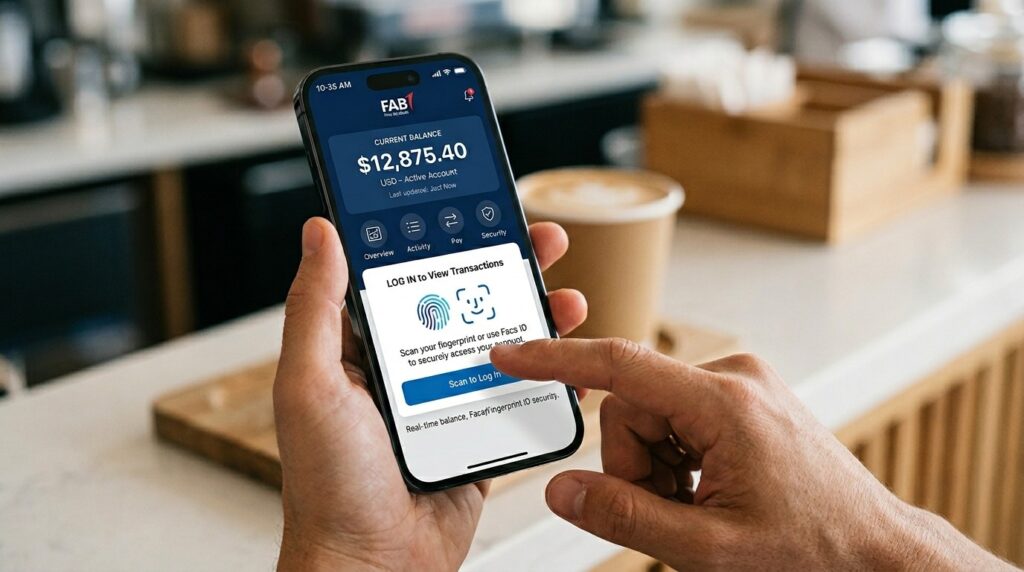
The mobile app is the most popular choice. It shows real-time balances. It works on iPhone and Android. Fingerprint or face ID keeps the account secure.
Download and setup
Get the app from the Apple App Store or Google Play Store. Search “First Abu Dhabi Bank.” Look for the official blue logo. Check the developer name before downloading. Fake apps exist.
Open the app. New users register using the debit card and 4-digit PIN. Existing online banking users log in with their username and password.
Login with fingerprint
Turn on biometric login during setup. After that, opening the app only needs a fingerprint or face scan. No password typing. It takes two seconds.
View balance on dashboard
Open the app. The dashboard loads right away. The primary account balance sits at the top in large text. Available balance and current balance appear below it. Recent transactions show underneath.
Available balance is money ready to spend. Current balance includes pending transactions. Knowing both prevents overspending.
Check other accounts
Swipe left or right on the dashboard. Savings accounts appear. Credit cards appear. Loan accounts appear. Each shows its own balance. Tap any account to see full transaction history.
Quick balance features
Enable the home screen widget. The balance shows up without opening the app. No login needed.
Turn on push notifications. The phone shows the new balance after every purchase or salary deposit.
Method 2: FAB Online Banking (Desktop)
Sometimes a computer works better. Printing statements or reviewing three months of transactions is easier on a larger screen.
Login process
Open a browser. Go to the official FAB website. Click the Personal Banking login button. Enter the username and password.
Complete two-factor authentication. FAB sends a one-time password to the registered mobile number. Enter that code.
Account summary page
After login, the account summary page loads. All linked accounts appear with current balances. Click any account to see detailed transaction history.
Credit card balances and loan amounts also show on the same page.
Download statements
Need a record of the balance on a specific date? Use the download feature. Select the account. Choose a date range. Click export to PDF or Excel.
This helps with visa applications or loan documents.
Method 3: SMS Balance Check (No Internet)
The Internet is not always available. No data plan. No Wi-Fi. No signal. SMS banking solves this problem.
How it works
Open the phone’s messaging app. Type the keyword. The standard keyword for FAB is BAL. Some customers use BALANCE. Check the welcome SMS from FAB to confirm.
Send the message to the FAB shortcode. For most customers, the number is 2828. Double-check this on the official FAB website. Shortcodes sometimes change.
Reply time
Within 5 to 10 seconds, an automated reply arrives. The message shows the available balance for the primary account. Some replies also show the last transaction amount and date.
Important notes
FAB charges no fee for SMS balance inquiries. Mobile carriers may charge standard SMS rates.
The response shows only the primary account. To check a different account, the SMS command may need an account nickname. Set this up through customer service.
Method 4: WhatsApp Banking (Convenient)
WhatsApp has become a major banking channel in the UAE. FAB’s WhatsApp service handles balance checks, mini-statements, and even some fund transfers.
Setup process
Save the official FAB WhatsApp number to phone contacts. Find this number on the FAB website or mobile app. Do not trust third-party sources.
Open WhatsApp. Send “Hi” or “Start.” The automated system responds with a welcome message.
Authentication happens next. The system asks for the registered mobile number. FAB sends a one-time password via SMS. Enter that OTP in the WhatsApp chat. This step happens only once.
Checking balance
After authentication, type “Balance” in the chat. Or tap the Balance button in the menu. The system replies instantly. The message shows the current available balance. Some versions also show the last three transactions.
Why customers use this method
No app download required. Most smartphones already have WhatsApp. Works on any internet connection. End-to-end encryption adds security. Only the customer and FAB see the balance information.
Quick Comparison
| Method | Speed | Internet Needed | App Required |
| Mobile App | Under 10 sec | Yes | Yes |
| Online Banking | 30-60 sec | Yes | No |
| SMS | 5-10 sec | No | No |
| Under 10 sec | Yes | No |
Troubleshooting Common Issues
Mobile app shows no balance
Check internet connection. Pull down on the dashboard screen to refresh. Log out and log back in. Restart the phone if nothing works.
SMS not working
Confirm the keyword. Try both BAL and BALANCE. Confirm the shortcode. Call FAB customer service to verify. Check prepaid credit balance. Some prepaid plans block SMS when credit is low.
WhatsApp not responding
Send “Start” again to reset the session. Check internet connection. Verify the number on the FAB website. The official number may have changed.
Online banking login fails
Click Forgot Password. Enter the username or registered mobile number. FAB sends a reset link via SMS or email. Follow the link to create a new password.
Wrong balance shown
Refresh the app or website. Pending transactions may not appear immediately. Wait 24 hours. The balance corrects itself after all transactions settle.
Security Tips for Online Balance Checks
- Never share a one-time password. FAB will never ask for an OTP. Not by call. Not by SMS. Not by email. Anyone asking is a scammer.
- Use only official FAB channels. The real app. The real website. The real WhatsApp number.
- Enable biometric login on the mobile app. Fingerprint or face ID is harder to steal than a password.
- Log out on shared devices. Do not save login information on public computers.
- Review transaction history weekly. Balance alone does not show fraud.
Frequently Asked Questions
The mobile app widget or WhatsApp. Both return the balance in under 10 seconds.
No. All methods are free. Mobile carriers may charge standard SMS rates for prepaid plans.
Yes with the official FAB number. End-to-end encryption applies.
Enable the home screen widget. The balance appears without opening the app.
Available balance is ready to spend. Current balance includes pending transactions.
Final Thoughts
Checking a FAB balance in 2026 offers four easy methods. The mobile app is the fastest. Online banking works on desktop. SMS works without the internet. WhatsApp offers convenience without downloading another app. Choose the method that fits the situation. Set up the mobile app for daily use. Keep the SMS shortcode handy for emergencies. Save the WhatsApp number for quick checks. For the most convenient and secure fab bank balance check, the mobile app remains the best choice. Download it. Set up fingerprint login. Enable the home screen widget. The balance is always just a glance away.
Apart from that if you want to know about IT Equipment Rental for Events in Dubai: A Smarter Way to Power Temporary Setups then please visit our UAE Market Category.